
What is a Temperature Sensor (LM35)? Explained
The LM35 temperature sensor is one of the most popular and beginner-friendly electronic sensors used in Arduino and DIY electronics projects. It is widely used for measuring temperature accurately in Celsius without requiring complicated calibration. Whether you are building a weather station, smart home project, or temperature monitoring system, the LM35 sensor is an excellent choice.
In this guide, you will learn what an LM35 temperature sensor is, how it works, pin configuration, circuit connection, Arduino interfacing, applications, advantages, and limitations.

What is an LM35 Temperature Sensor?
The LM35 is an analog temperature sensor that converts temperature into an analog voltage output. It is manufactured by Texas Instruments and is designed to provide temperature readings directly in degrees Celsius.
Unlike thermistors, the LM35 does not require external calibration. The sensor provides an output voltage that is linearly proportional to temperature.
LM35 Output Formula:
10mV output per °C
For example:
- 25°C = 250mV output
- 30°C = 300mV output
- 100°C = 1V output
LM35 Temperature Sensor Pin Configuration
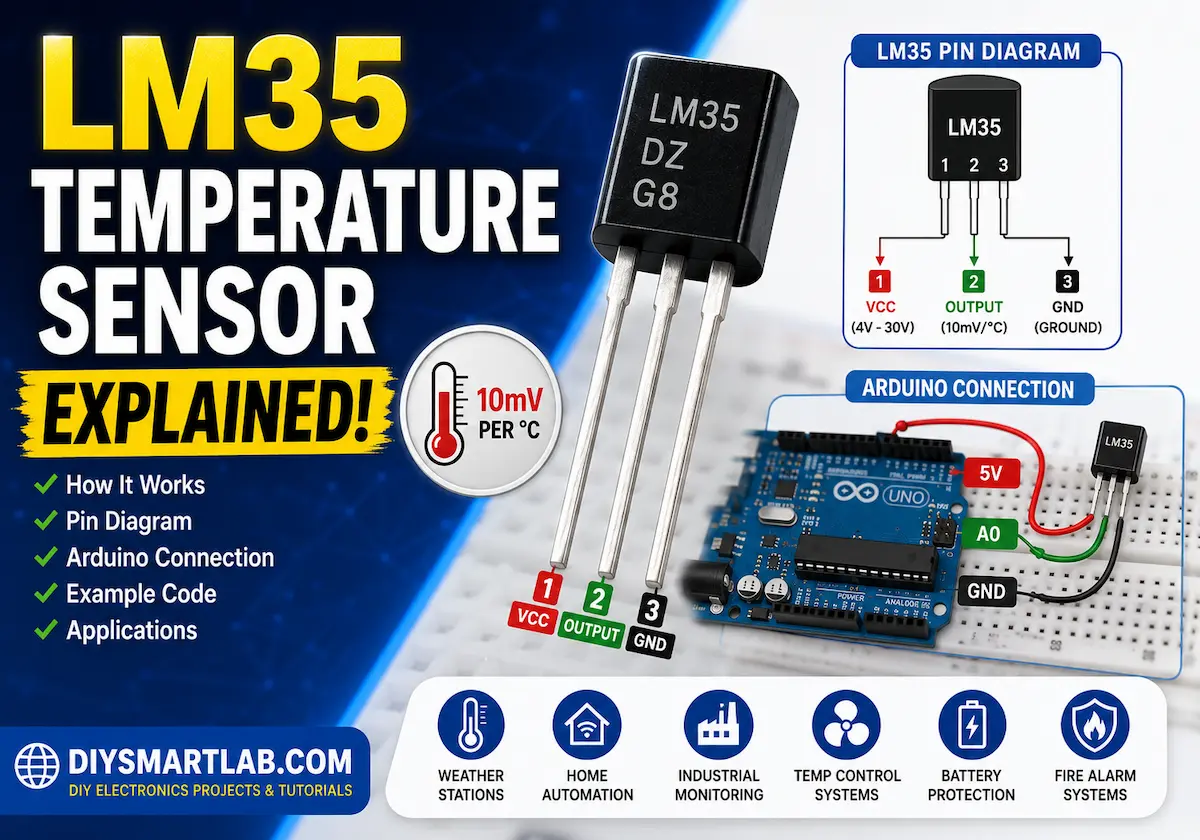
The LM35 sensor usually comes in a TO-92 transistor-like package with three pins.

| Pin Number | Pin Name | Description |
|---|---|---|
| 1 | VCC | Power Supply (4V to 30V) |
| 2 | Output | Analog Voltage Output |
| 3 | GND | Ground |
How Does the LM35 Temperature Sensor Work?
The LM35 works by sensing the surrounding temperature and converting it into a proportional analog voltage. The hotter the environment, the higher the output voltage.
The sensor contains internal semiconductor material whose electrical properties change according to temperature. This change is processed internally and provided as a clean analog output.
The output voltage can easily be read using:
- Arduino
- ESP8266
- ESP32
- Raspberry Pi (with ADC)
- Microcontrollers
LM35 Temperature Calculation Formula
The temperature can be calculated using the following formula:
:contentReference[oaicite:0]{index=0}Example:
- If output voltage = 300mV
- Temperature = 300 ÷ 10 = 30°C
Features of LM35 Temperature Sensor
- Calibrated directly in Celsius
- Low self-heating
- High accuracy
- Simple analog output
- Low power consumption
- Works with Arduino and microcontrollers
- Temperature range: -55°C to +150°C
LM35 Temperature Sensor with Arduino
The LM35 is commonly used with Arduino boards for temperature monitoring projects.
Connection Diagram

- LM35 VCC → Arduino 5V
- LM35 GND → Arduino GND
- LM35 Output → Arduino A0
Arduino Code Example
int sensorPin = A0;

void setup() {
  Serial.begin(9600);
}

void loop() {
  int reading = analogRead(sensorPin);

  float voltage = reading * (5.0 / 1023.0);

  float temperature = voltage * 100;

  Serial.print("Temperature: ");
  Serial.print(temperature);
  Serial.println(" °C");

  delay(1000);
}
Applications of LM35 Temperature Sensor
The LM35 sensor is widely used in electronics and automation projects.

- Weather monitoring systems
- Smart home automation
- Temperature-controlled fans
- Industrial monitoring systems
- Fire alarm systems
- Arduino projects
- IoT temperature monitoring
- Battery temperature protection
Advantages of LM35 Sensor
- Easy to use
- Low cost
- No calibration required
- Accurate temperature readings
- Compatible with most microcontrollers
- Low power consumption
Limitations of LM35 Sensor
- Analog output may pick up noise
- Requires ADC for digital systems
- Less accurate than digital sensors in some applications
- Not waterproof by default
LM35 vs DHT11 Temperature Sensor
| Feature | LM35 | DHT11 |
|---|---|---|
| Output Type | Analog | Digital |
| Measures Humidity | No | Yes |
| Accuracy | Higher | Moderate |
| Ease of Use | Simple | Requires Library |
| Temperature Unit | Celsius | Celsius |
Tips for Using LM35 Sensor
- Keep wires short to reduce noise
- Use a capacitor near the sensor for stable readings
- Avoid placing the sensor near heat-generating components
- Use averaging in Arduino code for better accuracy
Conclusion
The LM35 temperature sensor is an excellent sensor for beginners and professionals alike. Its simple analog output, good accuracy, and easy interfacing make it ideal for Arduino, IoT, and DIY electronics projects.
If you want to build a temperature monitoring system or learn sensor interfacing, the LM35 is one of the best sensors to start with.
Frequently Asked Questions (FAQs)
What is the use of LM35?
The LM35 is used for measuring temperature in electronics and automation projects.
Is LM35 analog or digital?
The LM35 is an analog temperature sensor.
Can LM35 work with Arduino?
Yes, the LM35 can easily interface with Arduino boards using analog input pins.
What is the output voltage of LM35?
The LM35 provides 10mV output per degree Celsius.
What is the temperature range of LM35?
The LM35 can measure temperatures from -55°C to +150°C.
You May Also Like
- What is an IR Sensor? Working and Applications Guide
- What is an Ultrasonic Sensor? Distance Measurement Guide
- Best Arduino Sensors for Beginners and DIY Projects
- What is Arduino Uno? Features, Pin Diagram and Projects
- What is IoT? Explained for Beginners
- Smart Irrigation System Using Arduino – Beginner Friendly Guide